
Data Fundamentals (Learn Data Engineering)
As a data professional you need to understand how data is stored and structured. This is an introduction to Data Formats, File Types, and Databases.

Read time: 6 minutes
Interested in learning the basics of data? In need of a refresher? In this post we are going to cover the core concepts which underpin data workloads; how is data structured, frequently used file types and an introduction to databases. This will be a good resource for those interested in the Microsoft Azure Data Fundamentals (DP-900) certification. The topics covered here are a foundational component of more sophisticated topics such as data analysis, engineering and machine learning.
How Is Data Structured?
To keep things simple, we are going to define data as a collection of facts, figures, measurements, or observations. Data often represents an entity (a person, object, or event) which has attributes (e.g. a person’s age and address, or a book’s page count).
In broad strokes, data can be classified into three levels depending on how organized it is:
Structured Data: The data has a fixed schema; it has the same properties in each instance. This often fits into a table with each row representing an instance of a data entity and columns representing the different attributes of that entity.
Semi-Structured Data: The data has some structure, but it is not rigid and allows variation between entity instances. This typically takes the format of key-value pairs.
Unstructured Data: Data that is neither structured nor semi-structured is referred to as unstructured data. This includes documents, images, audio, and video data. Information is often extracted from unstructured data which is then processed and converted into structured data.
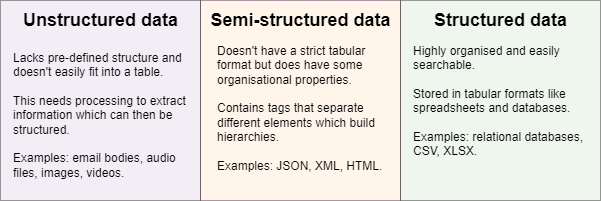
To explicitly highlight the differences between these types of data, we will use an example of scientific publications.
Example: Scientific Publications
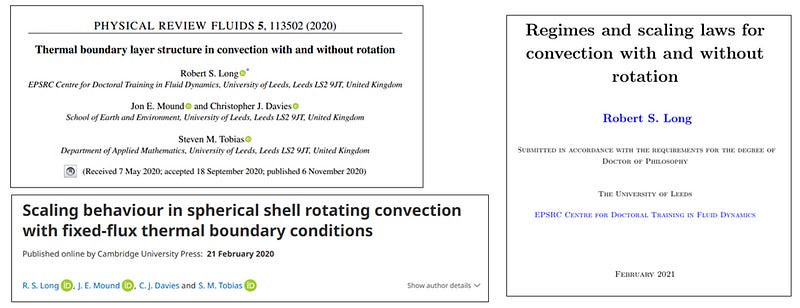
Unstructured Data: In Figure 2, we see three examples of title pages that all contain key information about each publication, including the title, authors, publisher, publication date, etc. However, each example stores this information differently, in different places on the page, in different formats, and without labels for each attribute. This lack of structure (rather obviously) makes this unstructured data.
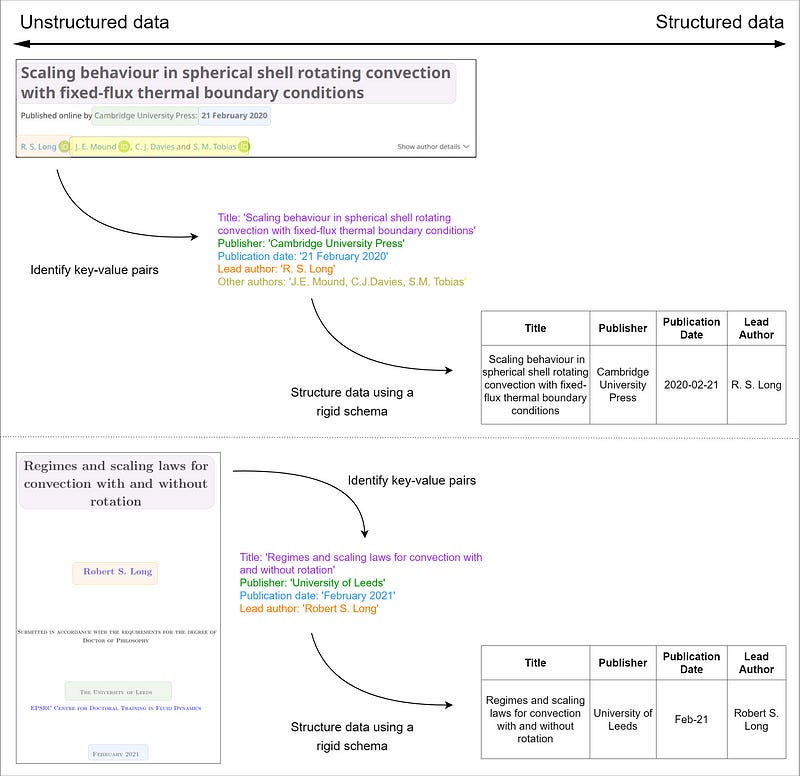
Semi-Structured Data: In Figure 3, we highlight the process of extracting key information from these title pages and create key-value pairs. When we compare the two, we see that they share most of the same keys, but the first example stores an additional attribute “Other authors” — given our definitions above, these are an example of semi-structured data.

Structured Data: To add further structure to this data, we define a rigid schema, in this case only keeping the four keys that both examples have in common, and we create a table. This is shown in Table 1 and now meets the criteria for structured data.
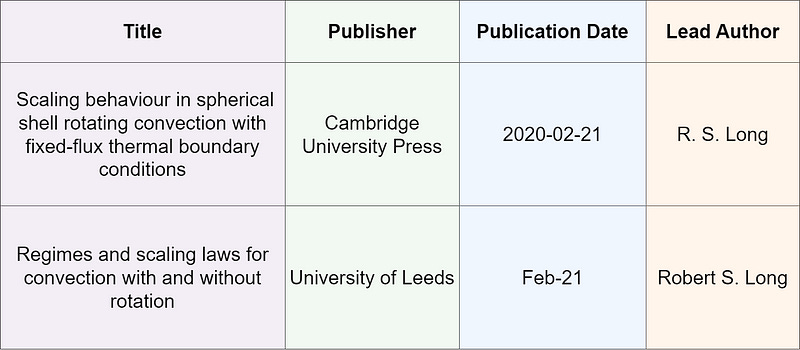
At this point, you may want to consider applying business logic to standardize how the data is stored. You probably want to have all of the data or author names in a consistent format.
Workflow: The flow from unstructured through semi-structured to structured data is summarized in Figure 5.
Regardless of the type of data you have, you need somewhere to store it! Files can be stored on a local hard disk, a USB drive, a centralised server, or storage hosted in the cloud. Unstructured data is typically kept in a file store, whereas semi-structured and structured data are stored in databases.
Data Storage
File Types
There are more file formats than could possibly be mentioned here, but we will focus on some of the mostly wide used for storing data. Choosing the most appropriate format depends on various factors, including:
the type of data (structured, semi-structured, unstructured)
which applications need to read, write, process the data
whether or not the data files need to be readable by humans, or optimized for efficient processing
Common file formats include:
Delimited text files:
– Delimited text files are simple, human-readable formats best suited for structured data.
– They use delimiters (such as commas, tabs, or pipes) to separate values and are widely used for data storage and exchange.
– The most common is comma-separated values (CSV) which uses commas to separate values, and a carriage return or new line to terminate a row.
– These files are widely used for simple data storage and exchange due to their readability and ease of use. They are supported by most spreadsheet software and database systems.JSON:
– JSON is a versatile, human-readable format for structured and semi-structured data.
– JSON uses key-value pairs and arrays to represent data. It is text-based, using curly braces {} for objects and square brackets [] for arrays.
– Format with hierarchical document schema used to define entities that can have multiple properties.
– JSON is commonly used for web APIs, configuration files, and data interchange between systems. Its simplicity and flexibility make it popular in modern web development.XML (Extensible markup language)
– XML is a markup language, human-readable and machine-readable format used for structured and semi-structured data.
– XML uses tags enclosed in angle brackets <> to define elements and their relationships.
– Format with hierarchical structures, making it suitable for representing complex data.
– XML is used for configuration files, document storage, and web-services where data integrity and structure are important.
– XML has been largely superseded by JSON format but still exists in legacy systems.
Optimized file formats include:
Avro
– Avro is a row-oriented format, machine-readable format, best suited for structured and semi-structured data.
– Row-Oriented Storage: Avro is optimized for highly efficient read and write operations. Each record is stored sequentially, simplifying the serialization process.
– Schema Definition: Each Avro file includes the schema to write the data, allowing easy data exchange and enabling schema evolution.
– Serialization format: Avro is a compact binary format, ensuring efficient storage and data transfer, making it an attractive option when data interchanges between different systems.ORC (Optimized Row Columnar)
– ORC is a columnar storage format, machine-readable, best suited for structured data.
– Stripes: ORC files are divided into stripes, each an independent unit of work containing multiple rows, allowing efficient processing and parallelization.
– Column Storage: Within each stripe, data is stored in column chunks, which allows compression and fast query performance.
– Indexing and Metadata: ORC stripes contain metadata and indexes, including statistical information (count, sum, etc.) which is stored in the footer.Parquet
– Parquet is a columnar storage format, machine-readable, best suited for structured and semi-structured data.
– Row Groups: Parquet divides data into row groups, which can be processed independently, making it suitable for distributed processing frameworks like Spark.
– Column chunks: Within each row group, data is stored in column chunks, which allows compression and retrieval of specific columns during queries.
– Metadata: Each row group contains metadata and statistics (min, max, etc.) for each column. This metadata enables optimized query performance.
Databases
A database is a dedicated system used to organize and store a collection of data which is readily accessible for queries.
Databases are often divided into two types:
Relational databases
– Relational databases are used for structured data, storing information in tables with rows and columns using a rigid, predefined schema.
– Entities are assigned a primary key that uniquely identifies it and these keys are used to reference the entity instance across multiple tables.
– Using these keys enables a relational database to be normalized (eliminating duplicated data)
– Tables are managed and queried using the Structured Query Language (SQL)Non-relational databases (known as non-SQLz
– Non-relational databases have flexible data models which can support:
a. Key-value Databases: Each record has unique key and an associated value, which can be in any format.
b. Document Databases: A specific form of key-value database where the value is a JSON document, facilitating parsing and querying.
c. Column Family Databases: Store tabular data (columns and rows) with the columns grouped into column-families that are logically related together.
d. Graph Databases: Entities are stored as nodes with links between them defining their relationships.
Conclusion
Navigating data storage and data processing is crucial for anyone involved in the world of data. This article has delved into the essential concepts of the different types of data, file types and databases. Whether you’re gearing up for the Microsoft Azure Data Fundamentals certification or simply aiming to expand your knowledge, these foundational principles are key to mastering more advanced topics in data analysis, engineering, and machine learning.
Thanks for reading! Feel free to follow us on LinkedIn here and here. See you next time!
To receive new posts and support our work, become a free or paid subscriber today.
If you enjoyed this newsletter, comment below and share this post with your thoughts.